
5 Essential Two-Way Radio Maintenance Tips
, by Jesus Moraga, 7 min reading time
, by Jesus Moraga, 7 min reading time
A two-way radio that fails at the wrong moment can mean a missed safety call, a stalled job site, or a lost shipment. The good news is that most failures are preventable. This guide covers five maintenance habits that keep your radios working reliably, plus a quick checklist and answers to common battery questions.
Two-way radios take a beating. Dust, moisture, drops, and daily wear add up faster in demanding environments like construction sites, warehouses, and vehicle fleets than most people expect. In our experience, a neglected radio degrades gradually: a scratchy speaker here, a battery that drains faster there, until the day it doesn't turn on at all.
Regular maintenance protects your investment and, more importantly, protects your team's ability to communicate when it counts. Knowing how to care for and maintain your portable radio is what keeps that durability intact over years of use, not just months.
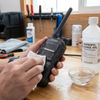
Dirt, dust, and grime aren't just cosmetic problems. They work into buttons, speaker grilles, and charging contacts, where they cause sticky keys, muffled audio, and poor charging connections over time.
Wipe down the exterior with a soft, lint-free cloth and, if needed, a small amount of mild soap and water or isopropyl alcohol. Avoid soaking the radio or spraying liquid directly onto it, especially near the microphone, speaker, or charging port. For radios used in dusty environments like construction sites or warehouses, use a soft brush or compressed air to clear debris from buttons and ports before it works its way inside.
Charging contacts deserve special attention. A build-up of oxidation or grime on the contacts can prevent a full charge even when the charger and battery are both working correctly. A quick wipe with a dry cloth or contact cleaner keeps the connection solid.
Battery care is one of the most overlooked areas of two-way radio maintenance, and it's also one of the most consequential. A radio is only as reliable as its battery, and poor handling shortens battery life dramatically.
Avoid letting batteries sit fully depleted for extended periods. Lithium-ion batteries, which power most modern professional two-way radios, degrade faster when stored at 0% charge. If a radio won't be used for a while, store the battery at roughly 40-60% charge in a cool, dry location away from direct sunlight and extreme temperatures.
Overcharging is less of a concern with modern smart chargers, which cut off power once the battery reaches full capacity, but leaving batteries on a charger indefinitely still generates heat that accelerates wear. Remove batteries once they're charged rather than leaving them connected around the clock.
Also inspect battery contacts and casings periodically for corrosion, swelling, or cracks. If a battery is swollen, remove it from service immediately — it's a safety hazard.
Many professional two-way radios carry an IP rating (Ingress Protection rating), which indicates how well the housing resists dust and water. An IP67 rating protects a radio against dust ingress and lets it withstand temporary submersion in up to one meter of water. But that protection depends entirely on intact seals and gaskets around ports, battery compartments, and buttons.
Over time, seals can wear down, crack, or shift, especially on radios that see daily use in rough conditions. Inspect rubber gaskets and port covers regularly for gaps, tears, or stiffness. A compromised seal lets moisture and dust bypass the radio's IP rating entirely, no matter how high that rating was on day one.
Always close port covers securely after connecting a charger, headset, or accessory. Leaving a port exposed, even briefly, in a dusty or wet environment defeats the purpose of a sealed housing.
The antenna is one of the most exposed components on a two-way radio, and antenna damage is a common cause of poor range and dropped transmissions. A cracked, bent, or loose antenna can significantly reduce a radio's effective range, even if every other component is functioning normally.
Check the antenna connection point regularly to confirm it's screwed on securely and hasn't developed play at the base. Inspect the antenna itself for visible cracks or damage, particularly after drops or heavy use. If your team operates in environments where equipment is frequently jostled, such as construction sites or delivery vehicles, our DIY repair and maintenance tips for two-way radios can help you catch antenna and connector issues early.
Also inspect any external connectors, including those for speaker microphones, headsets, and vehicle charging adapters. A worn or bent connector pin can cause intermittent audio or charging issues that are easy to mistake for a bigger problem.
Routine at-home care handles most day-to-day wear, but some issues require a closer look from a technician. Internal component wear, calibration drift, and programming issues aren't always visible from the outside, and catching them early prevents small problems from becoming radio failures in the field.
If you notice inconsistent range, distorted audio, or a battery that no longer holds a charge despite proper handling, it's time for a professional evaluation. Following best practices for using two-way radio equipment alongside routine servicing helps you catch issues before they become failures in the field.
For fleets and teams relying on radios daily, we recommend an annual check-up. It's a small investment that helps you avoid unplanned downtime when you need reliable communication most.
Daily (high-use environments):
Weekly:
Monthly:
Annually:
How long a two-way radio battery lasts depends heavily on charging habits and usage frequency, but most users notice a real drop in performance within a few years of regular use. If a battery holds noticeably less charge than it used to or drains unusually fast, it's time to replace it, even if it's still fairly new.
Manufacturer-specific batteries match the exact voltage, capacity, and safety specifications your radio model needs. Generic batteries may fit physically but can charge inconsistently, degrade faster, or pose safety risks. For reliable performance, use a battery designed for your specific radio model.
Two-way radios are built to handle demanding environments, but they still need consistent care to perform at their best. Regular cleaning, proper battery handling, seal inspections, antenna checks, and professional servicing all work together to extend the life of your equipment and keep your team connected when it matters.
Ready to make sure your equipment is up to the job? Explore our range of professional two-way radios and accessories built for reliability in the field.


